Helion DSL for GPU kernel development and assessment on AMD GPUs#
Author: Charles Yang
Knowledge level: Intermediate
Helion is a Python-embedded domain-specific language (DSL) from Meta for authoring machine learning kernels. It compiles down to Triton, a performant backend from OpenAI for programming GPUs and other devices. Helion aims to raise the level of abstraction compared to Triton, making it easier to write correct and efficient kernels, while enabling greater automation in the autotuning process.
Helion can be viewed as either PyTorch with tiles or as a higher-level Triton application. Compared to Triton, Helion reduces manual coding effort through autotuning. Helion spends more time (approximately 10 minutes) autotuning as it evaluates hundreds of potential Triton implementations generated from a single Helion kernel. This larger search space also makes kernels more performance portable between different hardware.
Helion is supported by AMD GPUs. This tutorial demonstrates how to set up the Helion development environment, implement a Helion kernel, and benchmark performance with Triton and Torch on AMD Instinct™ GPUs.
The Helion autotuner#
The key differentiator of Helion is its automated, ahead-of-time (AOT) autotuning engine. In Triton, developers are responsible for manually defining the search space for optimizations. This requires explicitly enumerating every configuration to be tested, a tedious process that limits the scope of exploration.
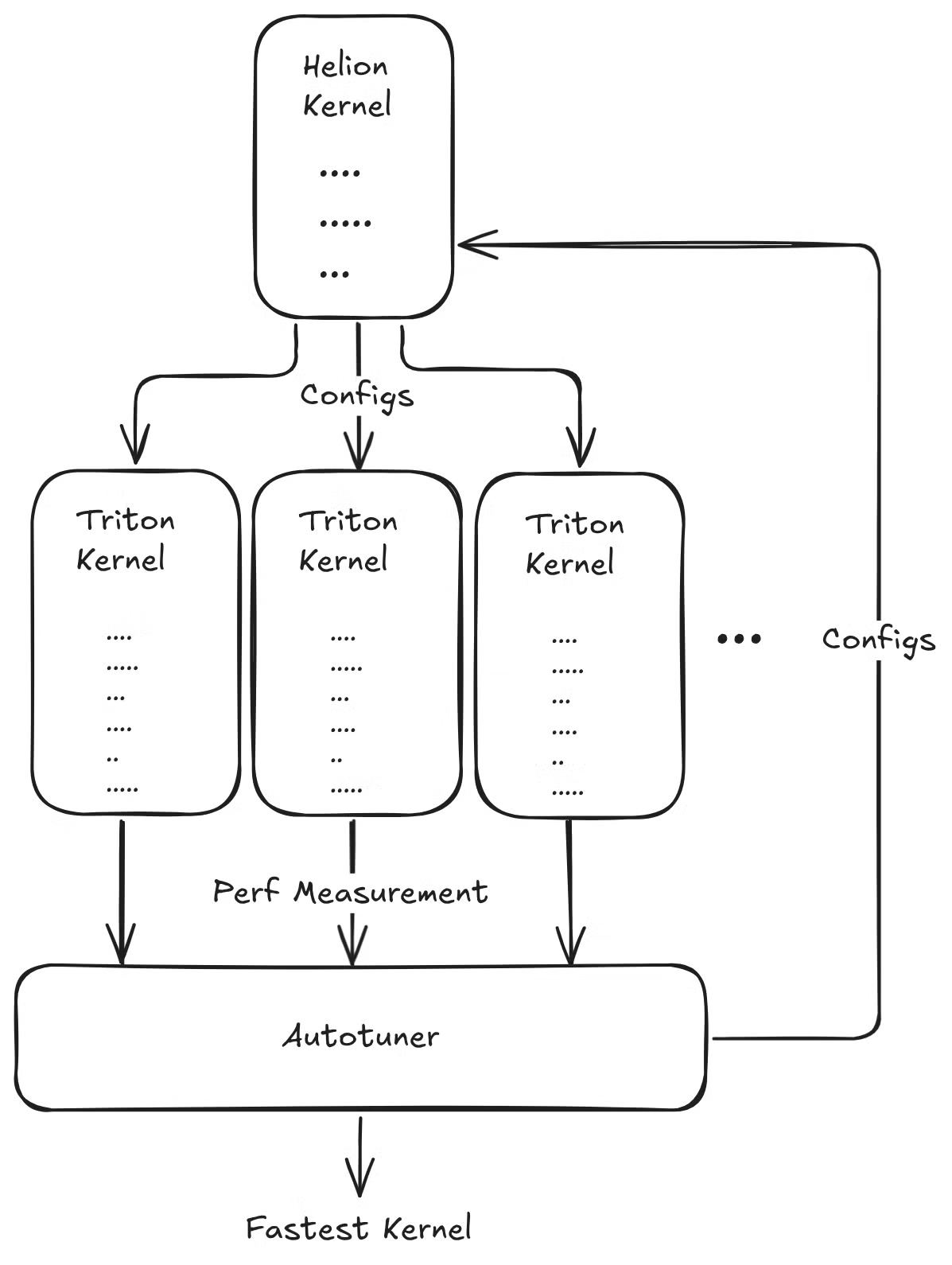
Helion changes this dynamic by using implicit search spaces. The high-level language automatically constructs a vast, multi-dimensional search space over the implementation choices. For example, a single hl.tile call implicitly instructs the autotuner to explore different block sizes and loop orderings and consider whether to flatten the iteration space into a single dimension. One Helion kernel definition can therefore map to thousands of Triton configurations, allowing the autotuner to create a much larger and richer search space in which to discover a superior configuration.
Tutorial workflow#
This tutorial includes the following:
Prerequisites#
This tutorial was developed and tested using the following setup.
Operating system#
Ubuntu 22.04/24.04: Ensure your system is running Ubuntu 22.04 or 24.04.
Hardware#
AMD Instinct MI300X GPU: This tutorial was tested on an AMD Instinct MI300X GPU. Ensure you are using an AMD Instinct GPU with ROCm support and that your system meets the official requirements.
Software#
ROCm 7.0: Install and verify ROCm by following the ROCm install guide. After installation, confirm your setup using:
amd-smi
This command lists your AMD GPUs with relevant details.
Note: For ROCm 6.4 and earlier, use the
rocm-smicommand instead.AMD also provides prebuilt ROCm Docker images, including a ROCm PyTorch image, a ROCm Ubuntu 22.04 image, and a ROCm Ubuntu 24.04 image. You can use these prebuilt Docker images to reduce the effort required to set up a ROCm environment.
Docker: Ensure Docker is installed and configured correctly. Follow the Docker installation guide for your operating system.
Note: Ensure the Docker permissions are correctly configured. To configure permissions to allow non-root access, run the following commands:
sudo usermod -aG docker $USER
newgrp docker
Verify Docker is working correctly with:
docker run hello-world
Hugging Face API access#
Obtain an API token from Hugging Face for downloading models.
Ensure the Hugging Face API token has the necessary permissions.
1. Environment setup with Docker and ROCm#
Follow these steps to set up the environment, launch Jupyter Notebooks, and install the dependencies.
Launch the Docker container#
Launch the Docker container. From your host machine, run this command:
docker run -it --rm \
  --privileged \
  --network=host \
  --device=/dev/kfd \
  --device=/dev/dri \
  --group-add=video \
  --ipc=host \
  --cap-add=SYS_PTRACE \
  --security-opt seccomp=unconfined \
  --shm-size 8G \
  -v $(pwd):/workspace \
  -w /workspace/notebooks \
  rocm/pytorch:latest bash
Note: This command mounts the current directory to the /workspace directory in the container. Ensure the notebook file is either copied to this directory before running the Docker command or uploaded into the Jupyter Notebook environment after it starts. Save the token or URL provided in the terminal output to access the notebook from your web browser. You can download this notebook from the AI Developer Hub GitHub repository.
Launch Jupyter Notebooks in the container#
Inside the Docker container, install Jupyter using the following command:
pip install jupyter
Start the Jupyter server:
jupyter-lab --ip=0.0.0.0 --port=8888 --no-browser --allow-root
Note: Ensure port 8888 is not already in use on your system before running the above command. If it is, you can specify a different port by replacing --port=8888 with another port number, for example, --port=8890.
Install Helion and Triton#
It’s strongly recommended that you use the latest version of Helion in your project. AMD and other vendors frequently update their optimization passes and algorithms in Helion, which can help improve your Helion kernel performance.
Uninstall older versions of Helion and Triton#
First, uninstall any existing versions of Helion and Triton:
!pip uninstall -y helion triton
Install Helion and Triton#
Use the following commands to install Helion, Triton, and other requirements.
%%bash

pip install triton==3.5.1
pip install helion==0.2.6
pip install matplotlib

pip list | grep -E 'helion|triton|torch'

# Ignore the incompatibility error. It does not affect the execution of the examples in this notebook.
# Look for the string 'Successfully installed triton-xxx' to confirm Triton was installed successfully.
2. Helion GPU kernel example#
This example demonstrates how to implement an element-wise exponential (exp) function using Helion. It features both forward and backward passes using Helion’s tiling system for parallel computation. The implementation integrates seamlessly with the PyTorch autograd system, enabling high-performance, auto-differentiable operations. The example shows how to verify the implementation against the native PyTorch exponential function with full gradient support.
import torch

import helion
from helion._testing import DEVICE
from helion._testing import run_example
import helion.language as hl

@helion.kernel()
def exp_fwd(x: torch.Tensor) -> torch.Tensor:
    """
    Computes the exponential of all elements in the input tensor.

    Args:
        x: Input tensor

    Returns:
        Output tensor with the exponential of each element in the input
    """
    out = torch.empty_like(x)
    for tile in hl.tile(x.size()):
        out[tile] = torch.exp(x[tile])
    return out

# %%
@helion.kernel()
def exp_bwd(dy: torch.Tensor, exp_x: torch.Tensor) -> torch.Tensor:
    """
    Computes the gradient of the exponential function with respect to the input tensor.

    Args:
        dy: Gradient of the output tensor
        exp_x: Saved activation from the forward pass

    Returns:
        Gradient of the input tensor
    """
    dx = torch.empty_like(exp_x)
    for tile in hl.tile(exp_x.size()):
        dx[tile] = dy[tile] * exp_x[tile]
    return dx
The next cell defines the wrapper class of the exp kernel function.
# %%
class ExpFunction(torch.autograd.Function):
    @staticmethod
    def forward(
        ctx: object,
        x: torch.Tensor,
    ) -> torch.Tensor:
        """Forward pass for exp."""
        y = exp_fwd(x)
        ctx.save_for_backward(y)  # type: ignore[arg-type]
        return y

    @staticmethod
    def backward(  # type: ignore[override]
        ctx: object,
        grad_output: torch.Tensor,
    ) -> torch.Tensor:
        """Backward pass for exp."""
        (x,) = ctx.saved_tensors  # type: ignore[attr-defined]
        return exp_bwd(grad_output, x)
Verify the exp kernel implementation against PyTorch’s native exp function.
# %%
def exp(x: torch.Tensor) -> torch.Tensor:
    """
    Exponential with forward and backward support.

    Args:
        x: Input tensor

    Returns:
        Output tensor with the exponential of each element in the input
    """
    return ExpFunction.apply(x)  # type: ignore[no-any-return]

# %%
def check(n: int) -> None:
    """
    Verify the exp kernel implementation against PyTorch's native exp function.

    Args:
        n: Size of the test tensor
    """
    x = torch.randn(n, device=DEVICE, dtype=torch.float32, requires_grad=True)
    run_example(exp, torch.exp, (x,), bwd=True)


check(1024 * 1024)
3. Details of the softmax algorithm#
The softmax function is often used in classification CNN models and even transformer-based LLM models. It converts raw output scores, also known as logits, into probabilities by normalizing the exponential of each value by dividing it by the sum of all the exponentials. This process ensures that the output values are in the range (0,1) and sum up to 1, making them interpretable as probabilities. PyTorch has implemented the softmax function as a standard API.
The definition of the function \(y = Softmax(x)\) is:
where \(x,y \in \mathbb{R}^V\).
Naive version: Safe Softmax#
To achieve numerical stability, subtract the maximum value of the row vector from each input element before taking their exponentials. So the definition changes to:
where \(x,y \in \mathbb{R}^V\). This is known as the Safe Softmax algorithm.
According to the softmax algorithm definition, the Triton kernel implements the naive version (Equation 2). The kernel requires two for loops to obtain the maximum data and the corresponding sum of all the exponentials and an additional for loop to calculate the final softmax result. So it uses three loops altogether. The Safe Softmax algorithm is more fully described in Online normalizer calculation for softmax.
The performance of this kernel on an 8192x8192 tensor is calculated like this:
The block size of the
coldimension is 256.One program is allocated per row of the input tensor. This means the grid size is
n_rows, wheren_rowsequals the number of rows of the input tensor.The program instance (thread block) scans one row of the tensor and iteratively processes the data blocks of the current row to calculate the maximum value \(m_k\) of the current row. This is the first for loop.
The program instance (thread block) scans one row of the tensor and iteratively processes the data blocks of the current row to calculate the denominator (sum of exponentials) value \(d_j\) of the current row. This is the second for loop.
The program instance (thread block) scans one row of the tensor and iteratively processes the data blocks of the current row to calculate the final softmax value \(y_i\) of the current row. This is the third for loop.
4. Creating a Helion two-pass softmax kernel#
This example demonstrates multiple Helion kernel implementations of the softmax function, including a simple wrapper around the PyTorch softmax implementation and a numerically optimized two-pass version. It also includes a check function to compare these kernels against the built-in PyTorch softmax function to verify correctness.
import os
import random
import torch
import helion
from helion._testing import run_example
import helion.language as hl

SEED = 42
os.environ["PYTHONHASHSEED"] = str(SEED)
random.seed(SEED)
torch.manual_seed(SEED)
torch.cuda.manual_seed_all(SEED)
torch.backends.cudnn.deterministic = True
torch.backends.cudnn.benchmark = False

# %%
@helion.kernel(autotune_effort="quick")
def softmax_two_pass(x: torch.Tensor) -> torch.Tensor:
    """
    Numerically optimized Helion kernel performing softmax in two passes.
    Args:
        x (torch.Tensor): Input tensor of shape [m, n].
    Returns:
        torch.Tensor: Softmax output tensor of the same shape.
    """
    m, n = x.size()
    out = torch.empty_like(x)
    block_size_m = hl.register_block_size(m)
    block_size_n = hl.register_block_size(n)
    for tile_m in hl.tile(m, block_size=block_size_m):
        mi = hl.full([tile_m], float("-inf"), dtype=torch.float32)
        di = hl.zeros([tile_m], dtype=torch.float32)
        for tile_n in hl.tile(n, block_size=block_size_n):
            values = x[tile_m, tile_n]
            local_amax = torch.amax(values, dim=1)
            mi_next = torch.maximum(mi, local_amax)
            di = di * torch.exp(mi - mi_next) + torch.exp(
                values - mi_next[:, None]
            ).sum(dim=1)
            mi = mi_next
        for tile_n in hl.tile(n, block_size=block_size_n):
            values = x[tile_m, tile_n]
            out[tile_m, tile_n] = torch.exp(values - mi[:, None]) / di[:, None]
    return out
Check correctness by comparing the Helion softmax kernels against the PyTorch softmax function.
# %%
def check(m: int, n: int) -> None:
    """
    Runs correctness checks comparing Helion softmax kernels against PyTorch's softmax.
    Args:
        m (int): Number of rows in input tensor.
        n (int): Number of columns in input tensor.
    """
    x = torch.randn([m, n], device="cuda", dtype=torch.float16)
    run_example(softmax_two_pass, lambda x: torch.nn.functional.softmax(x, dim=1), (x,))


# %%
def main() -> None:
    """
    Main function to run the softmax kernel correctness check with example input size.
    """
    check(4096, 2560)


# %%
if __name__ == "__main__":
    main()
5. Performance benchmark and visualization#
This section compares the performance of Helion with Triton, PyTorch, and Aiter.
Control group: Triton fused-softmax and Aiter softmax#
This example demonstrates how to implement a fused softmax kernel using Triton, with architectural awareness for AMD ROCm with CDNA-based backends.
Implementation of Triton fused-softmax#
Triton provides a reference softmax sample named fused-softmax. Based on online softmax, it simplifies the maximum data calculation to remove one for loop. It also asks the compiler to use more threads per row by increasing the number of warps. This is often tuned for better performance. Finally, it bases the kernel launch scheme on the GPU hardware properties, resulting in higher GPU kernel occupancy and better performance.
import os
import random
import torch
import triton
import triton.language as tl
from triton.runtime import driver

DEVICE = triton.runtime.driver.active.get_active_torch_device()

SEED = 42
os.environ["PYTHONHASHSEED"] = str(SEED)
random.seed(SEED)
torch.manual_seed(SEED)
torch.cuda.manual_seed_all(SEED)
torch.backends.cudnn.deterministic = True
torch.backends.cudnn.benchmark = False

def is_hip():
    return triton.runtime.driver.active.get_current_target().backend == "hip"


def is_cdna():
    return is_hip() and triton.runtime.driver.active.get_current_target().arch in ('gfx940', 'gfx941', 'gfx942',
                                                                                   'gfx90a', 'gfx908', 'gfx950')

@triton.jit
def fused_softmax_kernel(output_ptr, input_ptr, input_row_stride, output_row_stride, n_rows, n_cols, BLOCK_SIZE: tl.constexpr,
                   num_stages: tl.constexpr):
    # starting row of the program
    row_start = tl.program_id(0)
    row_step = tl.num_programs(0)
    for row_idx in tl.range(row_start, n_rows, row_step, num_stages=num_stages):
        # The stride represents how much we need to increase the pointer to advance 1 row
        row_start_ptr = input_ptr + row_idx * input_row_stride
        # The block size is the next power of two greater than n_cols, so we can fit each
        # row in a single block
        col_offsets = tl.arange(0, BLOCK_SIZE)
        input_ptrs = row_start_ptr + col_offsets
        # Load the row into SRAM, using a mask since BLOCK_SIZE may be > than n_cols
        mask = col_offsets < n_cols
        row = tl.load(input_ptrs, mask=mask, other=-float('inf'))
        # Subtract maximum for numerical stability
        row_minus_max = row - tl.max(row, axis=0)
        # Note that exponentiation in Triton is fast but approximate (i.e., think __expf in CUDA)
        numerator = tl.exp(row_minus_max)
        denominator = tl.sum(numerator, axis=0)
        softmax_output = numerator / denominator
        # Write back output to DRAM
        output_row_start_ptr = output_ptr + row_idx * output_row_stride
        output_ptrs = output_row_start_ptr + col_offsets
        tl.store(output_ptrs, softmax_output, mask=mask)
Tune the kernel based on the properties of the target GPU platform.
# To tune the kernel, first get some resource properties of the GPU by:
properties = driver.active.utils.get_device_properties(DEVICE.index)
NUM_SM = properties["multiprocessor_count"]
NUM_REGS = properties["max_num_regs"]
SIZE_SMEM = properties["max_shared_mem"]
WARP_SIZE = properties["warpSize"]
target = triton.runtime.driver.active.get_current_target()
kernels = {}
print(f"NUM_SM: {NUM_SM}, NUM_REGS: {NUM_REGS}, SIZE_SMEM: {SIZE_SMEM}, WARP_SIZE: {WARP_SIZE}, target: {target}")

# Then set up the kernel launch configuration
torch.manual_seed(0)
x = torch.randn(8192, 8192, device=DEVICE)
output_torch = torch.softmax(x, dim=-1)
n_rows, n_cols = x.shape
# Allocate output
y = torch.empty_like(x)

# The block size of each loop iteration is the smallest power of two greater than the number of columns in `x`
BLOCK_SIZE = triton.next_power_of_2(n_cols*2)

# Another trick is to ask the compiler to use more threads per row by
# increasing the number of warps (`num_warps`) over which each row is distributed.
num_warps = 8

# Number of software pipelining stages.
num_stages = 4 if SIZE_SMEM > 200000 else 2

print(f"BLOCK_SIZE: {BLOCK_SIZE}, num_warps: {num_warps}, num_stages: {num_stages}")

# The occupancy of the kernel is limited by register usage. To maximize the occupancy, warm up the kernel to get register usage, and calculate the proper programs number.

# pre-compile kernel to get register usage and compute thread occupancy.
kernel = fused_softmax_kernel.warmup(y, x, x.stride(0), y.stride(0), n_rows, n_cols, BLOCK_SIZE=BLOCK_SIZE,
                                   num_stages=num_stages, num_warps=num_warps, grid=(1, ))
kernel._init_handles()
n_regs = kernel.n_regs
size_smem = kernel.metadata.shared

if is_hip():
    if is_cdna():
        NUM_GPRS = NUM_REGS * 2
    MAX_NUM_THREADS = properties["max_threads_per_sm"]
    max_num_waves = MAX_NUM_THREADS // WARP_SIZE
    occupancy = min(NUM_GPRS // WARP_SIZE // n_regs, max_num_waves) // num_warps
else:
    occupancy = NUM_REGS // (n_regs * WARP_SIZE * num_warps)

occupancy = min(occupancy, SIZE_SMEM // size_smem)
num_programs = NUM_SM * occupancy

num_programs = min(num_programs, n_rows)

print(f"n_regs: {n_regs}, size_smem: {size_smem}, occupancy: {occupancy}, num_programs: {num_programs}")
Install the ROCm Aiter kernel library#
Use the following commands to install the Aiter kernel library for the built-in softmax kernel function:
%%bash
git clone --recursive https://github.com/ROCm/aiter.git
cd aiter
python3 setup.py develop
Run the benchmark and visualization#
Now run the benchmark and visualization for all versions of the softmax kernels to obtain the results.
import os
import torch
import torch.nn.functional as F
import triton
import random
import triton.language as tl
import matplotlib.pyplot as plt

DEVICE = triton.runtime.driver.active.get_active_torch_device()

SEED = 42
os.environ["PYTHONHASHSEED"] = str(SEED)
random.seed(SEED)
torch.manual_seed(SEED)
torch.cuda.manual_seed_all(SEED)
torch.backends.cudnn.deterministic = True
torch.backends.cudnn.benchmark = False

# --- Helion Softmax ---
def softmax_helion(x: torch.Tensor, dim=-1):
    helion_output=softmax_two_pass(x)
    return helion_output

# --- Helper to run Triton Autotune ---
def softmax_triton(x: torch.Tensor):
    n_rows, n_cols = x.shape
    triton_output = torch.empty_like(x)
    kernel[(num_programs, 1, 1)](
        y,
        x,
        x.stride(0),
        y.stride(0),
        n_rows,
        n_cols,
        BLOCK_SIZE,
        num_stages)
    return triton_output

# --- PyTorch Naive Softmax ---
def softmax_torch(x: torch.Tensor, dim=-1):
    """
    Compute softmax using PyTorch built-in function.
    Output is the same shape as input.
    """
    torch_output = F.softmax(x, dim=dim)
    return torch_output

# --- Aiter Softmax ---
from aiter.ops.triton.softmax import softmax
def softmax_aiter(x: torch.Tensor):
    aiter_output = softmax(x)
    return aiter_output

# --- Triton Benchmark ---
@triton.testing.perf_report(
    triton.testing.Benchmark(
        x_names=['N'],  # argument names to use as an x-axis for the plot
        x_vals=[128 * i for i in range(55, 95)],  # different possible values for `x_name`
        line_arg='provider',  # argument name whose value corresponds to a different line in the plot
        line_vals=['helion','triton', 'aiter','torch'],  # possible values for `line_arg`
        line_names=["Helion Softmax","Triton Softmax", "Aiter Softmax","Torch Softmax"],  # label name for the lines
        styles=[('red', 'solid'),('cyan', 'solid'), ('black', 'solid'), ('orange', 'dashdot')],  # line styles
        ylabel="GB/s",  # label name for the y-axis
        plot_name="Softmax Performance Benchamrk",  # name for the plot. Used also as a file name for saving the plot.
        args={'M': 4096},  # values for function arguments not in `x_names` and `y_name`
    ))
def benchmark(M, N, provider):
    # x = torch.randn(M, N, device=DEVICE, dtype=torch.float32)
    gen = torch.Generator(device=DEVICE).manual_seed(SEED)
    x = torch.randn(M, N, device=DEVICE, dtype=torch.float32, generator=gen)

    quantiles = [0.5, 0.2, 0.8]

    if provider == 'torch':
        ms, min_ms, max_ms = triton.testing.do_bench(
            lambda: torch.softmax(x, dim=-1), rep=10, quantiles=quantiles
        )

    elif provider == 'aiter':
        ms, min_ms, max_ms = triton.testing.do_bench(
            lambda: softmax_aiter(x), rep=10, quantiles=quantiles
        )
    elif provider == 'triton':
        ms, min_ms, max_ms = triton.testing.do_bench(
            lambda: softmax_triton(x), rep=10, quantiles=quantiles
        )
    elif provider == 'helion':
        ms, min_ms, max_ms = triton.testing.do_bench(
            lambda: softmax_helion(x), rep=10, quantiles=quantiles
        )
    # Calculate bandwidth: 2 * (read + write) * size / time
    gbps = lambda ms: 2 * x.numel() * x.element_size() * 1e-9 / (ms * 1e-3)
    return gbps(ms)

# --- Run benchmark ---
benchmark.run(show_plots=True, print_data=True)
Summary#
Congratulations! By running this Helion GPU kernel development tutorial, you learned how to develop and optimize Helion kernels on AMD GPUs.
According to the final performance benchmark results, Helion not only simplifies high-performance GPU kernel development, but also delivers near-maximum performance, even outperforming Triton-based GPU kernels.
Ideally, this tutorial encourages you to write, tune, test, and contribute to the Helion kernel on ROCm and AMD GPUs, helping shape the future of AI acceleration.