TransferBench workflow#
Transfers enter the system either through presets or a configuration (config) file, both of which ultimately call
RunTransfers(), which is the main utility function within TransferBench.
Entry points#
Source |
Flow |
|---|---|
Presets |
The client selects a preset (for example, |
Config file or command line |
The client parses transfers from a config file or command-line arguments via
|
RunTransfers workflow#
RunTransfers() is the entry point into the backend TransferBench library:
/**
 * Run a set of Transfers
 *
 * @param[in] config     Configuration options
 * @param[in] transfers  Set of Transfers to execute
 * @param[out] results   Timing results
 * @returns true if and only if Transfers were run successfully without any fatal errors
 */
bool RunTransfers(ConfigOptions const& config,
                  vector<Transfer> const& transfers,
                  TestResults& results);
As shown in the following diagram, the function executes four sequential phases:
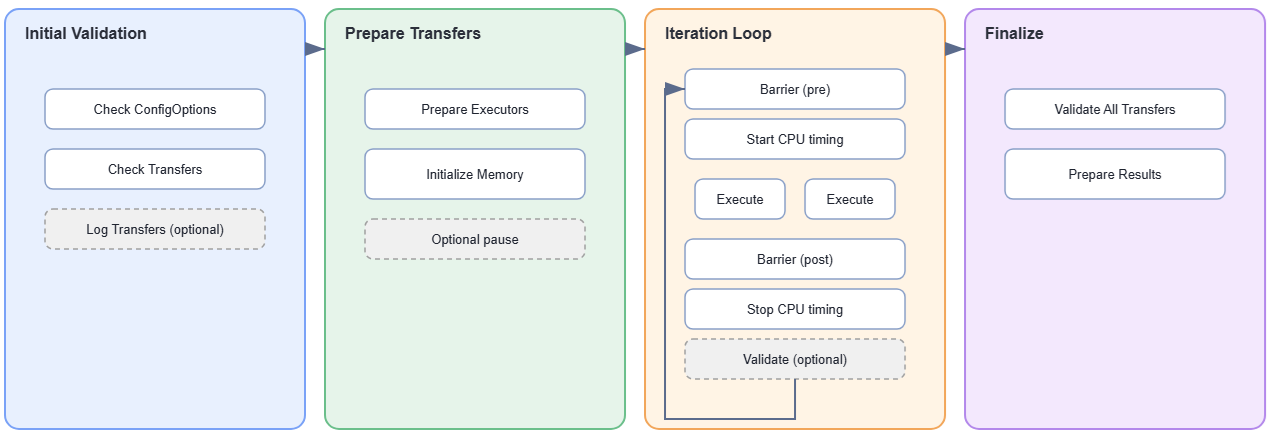
Initial validation: Checks that inputs are consistent and valid.
Prepare transfers: Allocates resources and initializes memory.
Iteration loop: Runs the timed transfer iterations.
Finalize: Validates results and assembles output.
Initial validation#
Here are the steps involved in the first phase:
Check ConfigOptions: Verify that the provided
ConfigOptionsare valid.ConfigOptionscontrol how TransferBench runs (for example, GFX unroll factor and number of warmup iterations). When running in multinode mode, consistency across ranks is also checked.Check transfers: Verify that the provided transfers are properly specified. Checks include confirming that requested devices exist and that each transfer has an appropriate number of source (SRC) and destination (DST) endpoints. When running in multinode mode, consistency across ranks is also checked.
Log transfers (optional): If
TB_DUMP_CFG_FILEis set, log the transfers to a config file that can be re-executed by TransferBench. This is useful for capturing the exact transfers run by a preset so they can be modified and replayed.
Prepare transfers#
Here are the steps involved in the second phase:
Prepare Executors: Perform all Executor-specific setup, such as creating HIP streams, allocating SRC and DST memory, and exchanging fabric handles for pod communication support. This step also divides the work across SubExecutors.
Initialize memory: Initializes SRC memory buffers with data patterns and computes reference results used for later validation.
Note
For GPU SRC memory locations, data is copied onto the GPUs via DMA (
hipMemcpy). If profiling, this copy appears as part of the profiling trace, which is why settingUSE_INTERACTIVE=1is recommended when profiling.Optional pause: When
USE_INTERACTIVE= 1, TransferBench pauses for user input after all memory has been initialized. Virtual addresses are printed at this point, which is useful for attaching a profiler before any transfers execute.
Iteration loop#
In the third phase, the iteration loop runs for the number of iterations specified by NUM_ITERATIONS.
Each iteration proceeds through the following steps:
Barrier (pre): Synchronizes all ranks before transfers begin, ensuring that every rank is ready before any rank starts executing transfers.
Start CPU timing: Starts a CPU timer on the current rank, capturing the total elapsed time across all transfers on this rank.
Execute: Spawns one CPU thread per Executor. Each Executor runs all the transfers it is assigned and is responsible for its own per-transfer timing.
Barrier (post): Waits for all Executors across all ranks to finish before proceeding.
Stop CPU timing: Stops the CPU timer.
Validate (optional): If
ALWAYS_VALIDATE= 1, performs a correctness check after each iteration to verify that destination memory matches the expected reference results.Note
By default, validation runs only once after all iterations complete. Setting
ALWAYS_VALIDATE= 1 validates after every iteration, which can help detect transient errors that would otherwise be masked by a passing final iteration.
Finalize#
Here are the steps involved in the last phase:
Validate all transfers: Check that the DST memory matches the expected reference results computed during the Initialize Memory step.
Prepare results: Collect timing data from each Executor and assemble the final
TestResultsoutput returned to the caller.