Run SpecForge with Primus#
primus-cli is the entrypoint for SpecForge capture and draft training.
Mode |
Values |
Meaning |
|---|---|---|
|
|
Which program Primus runs ( |
|
|
How train runs. Required when mode is |
offline train is specforge train on pre-captured hidden states. online
train is live Mooncake + SGLang capture plus --role producer / --role consumer. Capture is SpecForge scripts/prepare_hidden_states.py, not a
train mode.
Build the image first: runtime image. Inside the container,
Primus is /opt/primus and SpecForge is /workspace/SpecForge.
Launch with primus-cli#
Capture and offline train use
direct(inside the image),container(from the host), orslurm. On Slurm,-Nis the node count for one SpecForge job: data parallel across nodes, the same command on every node, and a sharedOUTPUT_DIR/HIDDEN_STATES_PATH.Online disaggregated train is
slurmonly.-Nis capture nodes plus trainer nodes, not a homogeneous DP job.
direct is the in-image command. container starts this image from the host
and runs the same command. slurm allocates nodes, then each node runs
container or direct. Multi-GPU on one node is NPROC_PER_NODE.
Inside the image:
./runner/primus-cli direct -- train pretrain --config <experiment.yaml>
From the host, capture or offline train:
./runner/primus-cli container --image primus-specforge:v0.5.14-rocm700-mi35x \
  --shm-size 64g --volume /data:/data \
  -- train pretrain \
  --config examples/specforge/configs/qwen3.5-4b-dflash-offline-capture.yaml
Multi-node capture or offline train (shared output path; -N is the node count):
./runner/primus-cli slurm srun -N 2 --gres=gpu:8 \
  -- container --image primus-specforge:v0.5.14-rocm700-mi35x \
  --volume /shared:/shared \
  -- train pretrain \
  --config examples/specforge/configs/qwen3.5-4b-dflash-offline-capture.yaml
Dotted CLI keys override YAML, for example
specforge_overrides.training.max_steps=1000. See the
configuration reference for the full configuration, CLI,
and env reference.
One-node online (Mooncake + SGLang + producer + consumer on a single host) is
SpecForge managed_local: run the SpecForge CLI inside this image, not
primus-cli. Follow the
AMD ROCm tutorial
§4.
Offline#
Capture, then train on disk hidden states. Example pair for Qwen3.5-4B DFlash (20-step smoke defaults).
Capture — specforge_mode: capture runs SpecForge
scripts/prepare_hidden_states.py. Recipe:
qwen3.5-4b-dflash-offline-capture.yaml.
# examples/specforge/configs/qwen3.5-4b-dflash-offline-capture.yaml
modules:
  pre_trainer:
    framework: specforge
    overrides:
      specforge_mode: capture
      specforge_root: ${SPECFORGE_ROOT:/workspace/SpecForge}
      specforge_capture:
        target_model_path: ${TARGET_MODEL:Qwen/Qwen3.5-4B}
        data_path: ${CAPTURE_DATA_PATH}
        output_path: ${OUTPUT_DIR}/hidden_states_raw
        nproc_per_node: ${NPROC_PER_NODE:1}
        nnodes: ${NNODES:1}
cd /opt/primus
export CAPTURE_DATA_PATH=/data/sharegpt.jsonl
export OUTPUT_DIR=/data/runs/capture
export NPROC_PER_NODE=8
./runner/primus-cli direct -- train pretrain \
  --config examples/specforge/configs/qwen3.5-4b-dflash-offline-capture.yaml
Train — specforge_mode: train with specforge_train_mode: offline.
specforge_config points at SpecForge’s YAML; Primus forwards overrides onto
specforge train. Recipe:
qwen3.5-4b-dflash-offline.yaml.
# examples/specforge/configs/qwen3.5-4b-dflash-offline.yaml
modules:
  pre_trainer:
    framework: specforge
    overrides:
      specforge_mode: train
      specforge_train_mode: offline
      specforge_config: ${SPECFORGE_CONFIG:/workspace/SpecForge/examples/configs/offline/colocated/qwen3.5-4b-dflash-offline-amd.yaml}
      specforge_root: ${SPECFORGE_ROOT:/workspace/SpecForge}
      specforge_overrides:
        training.max_steps: ${MAX_STEPS:20}
        data.hidden_states_path: ${HIDDEN_STATES_PATH}
        deployment.trainer.nproc_per_node: ${NPROC_PER_NODE:1}
        deployment.trainer.nnodes: ${NNODES:1}
cd /opt/primus
export HIDDEN_STATES_PATH=/data/runs/capture/hidden_states
export OUTPUT_DIR=/data/runs/train
export NPROC_PER_NODE=8
export MAX_STEPS=20
./runner/primus-cli direct -- train pretrain \
  --config examples/specforge/configs/qwen3.5-4b-dflash-offline.yaml
Online#
specforge_mode: train with specforge_train_mode: online is live
capture+train. SpecForge’s own CLI will not start Mooncake/SGLang across
nodes, so Primus does that and then launches --role producer /
--role consumer.
Run ./runner/primus-cli slurm on a Slurm cluster. Training runs inside
the docker image, or a bind-mount of this tree at /opt/primus. Example:
qwen3.5-4b-dflash-online.yaml.
# examples/specforge/configs/qwen3.5-4b-dflash-online.yaml
modules:
  pre_trainer:
    framework: specforge
    overrides:
      specforge_mode: train
      specforge_train_mode: online
      specforge_config: ${SPECFORGE_CONFIG:/workspace/SpecForge/examples/configs/online/disaggregated/external/qwen3.5-4b-dflash-online-amd.yaml}
      specforge_root: ${SPECFORGE_ROOT:/workspace/SpecForge}
      specforge_online:
        run_id: ${RUN_ID}
        run_root: ${RUN_ROOT}
        consumer_state_dir: ${CONSUMER_STATE_DIR}
        capture_nnodes: ${CAPTURE_NNODES:1}
        trainer_nnodes: ${TRAINER_NNODES:1}
        server_count: ${SERVER_COUNT:1}
        server_tp: ${SERVER_TP:1}
        trainer_nproc: ${NPROC_PER_NODE:1}
export RUN_ID=$(date -u +%Y%m%dT%H%M%SZ)
export RUN_ROOT=/path/to/shared/run/$RUN_ID
export OUTPUT_DIR=$RUN_ROOT/output
export CONSUMER_STATE_DIR=/path/to/local/nvme/specforge/$RUN_ID/consumer-state
export TRAIN_DATA_PATH=/path/to/sharegpt_train.jsonl
export MAX_STEPS=20
cd /opt/primus
./runner/primus-cli slurm srun -N 2 \
  --gres=gpu:1 \
  -- container --image primus-specforge:v0.5.14-rocm700-mi35x \
  --volume /shared:/shared \
  -- train pretrain \
  --config examples/specforge/configs/qwen3.5-4b-dflash-online.yaml
The example above is 1 capture GPU + 1 trainer GPU on 2 nodes. Load the
docker image on every node if the scheduler’s container store is
node-local. Do not wrap this in managed_local or --role both. On one
node, use SpecForge managed_local inside the image (see Launch above), not
primus-cli. SpecForge deployment.trainer.nnodes is TRAINER_NNODES
(consumer nodes only).
server_gpus / trainer_gpus default to 0; a single device id expands to
0..N-1 (N = server_count * server_tp or trainer_nproc), so 8+8 only
needs SERVER_COUNT=8 and NPROC_PER_NODE=8. Set an explicit CSV to pin
non-contiguous devices. Raise -N with CAPTURE_NNODES / TRAINER_NNODES
for more nodes.
How it works#
One Slurm allocation, the same primus-cli command on every node. Shape is
C capture nodes + T trainer nodes (CAPTURE_NNODES + TRAINER_NNODES,
default 1+1 so -N 2):
Slurm |
Role |
|---|---|
|
Capture: SGLang on GPU. Rank 0 also starts Mooncake and the SpecForge producer (CPU HTTP client to those servers). |
|
Wait for |
Rank 0 starts Mooncake, then local SGLang, collects every capture rank’s server
URLs, rewrites loopback into the producer and consumer commands, writes
inference.ready, and only then starts the producer. Other capture ranks start
SGLang only. Trainer ranks wait for inference.ready. Teardown is producer,
then SGLang, then Mooncake, after every consumer.done. When C=1, there are
no other capture ranks. When T>1, each consumer gets --node-rank inside
the trainer group.
        sequenceDiagram
    participant Cli as primus-cli slurm
    participant Cap0 as Capture rank 0
    participant CapN as Other capture ranks
    participant Train as Trainer ranks
    Cli->>Cap0: NODE_RANK 0
    Cli->>CapN: NODE_RANK 1 to C-1
    Cli->>Train: NODE_RANK C to C+T-1
    Cap0->>Cap0: start Mooncake then local SGLang
    CapN->>Cap0: wait for head.ip
    CapN->>CapN: start SGLang only
    Cap0->>Cap0: collect server URLs and rewrite loopback
    Cap0->>Cap0: write inference.ready
    Cap0->>Cap0: specforge train --role producer
    Train->>Cap0: wait for inference.ready
    Train->>Train: specforge train --role consumer
    Train-->>Cap0: consumer.done
    Cap0->>Cap0: stop producer then SGLang then Mooncake
Primus maps specforge_online.run_root / consumer_state_dir onto SpecForge
control_dir, output_dir, and consumer_state_dir. After allocate it
rewrites the SpecForge loopback endpoints to a routable capture-rank-0 IP.
PRIMUS_SPECFORGE_HEAD_IP / HEAD_IP apply only on capture rank 0
(Mooncake + producer). Capture replicas and trainers advertise
PRIMUS_SPECFORGE_LOCAL_IP if set, else the IPv4 on
PRIMUS_SPECFORGE_BIND_IFACE, else hostname. A job-wide HEAD_IP must not be
the per-node Mooncake hostname. Shared vs local directories, empty
control/SQLite trees, and the producer/consumer contract are SpecForge’s — see
online disaggregated training.
Reference results on MI355X#
Experiment setup and ShareGPT data prep follow the
SpecForge AMD ROCm tutorial.
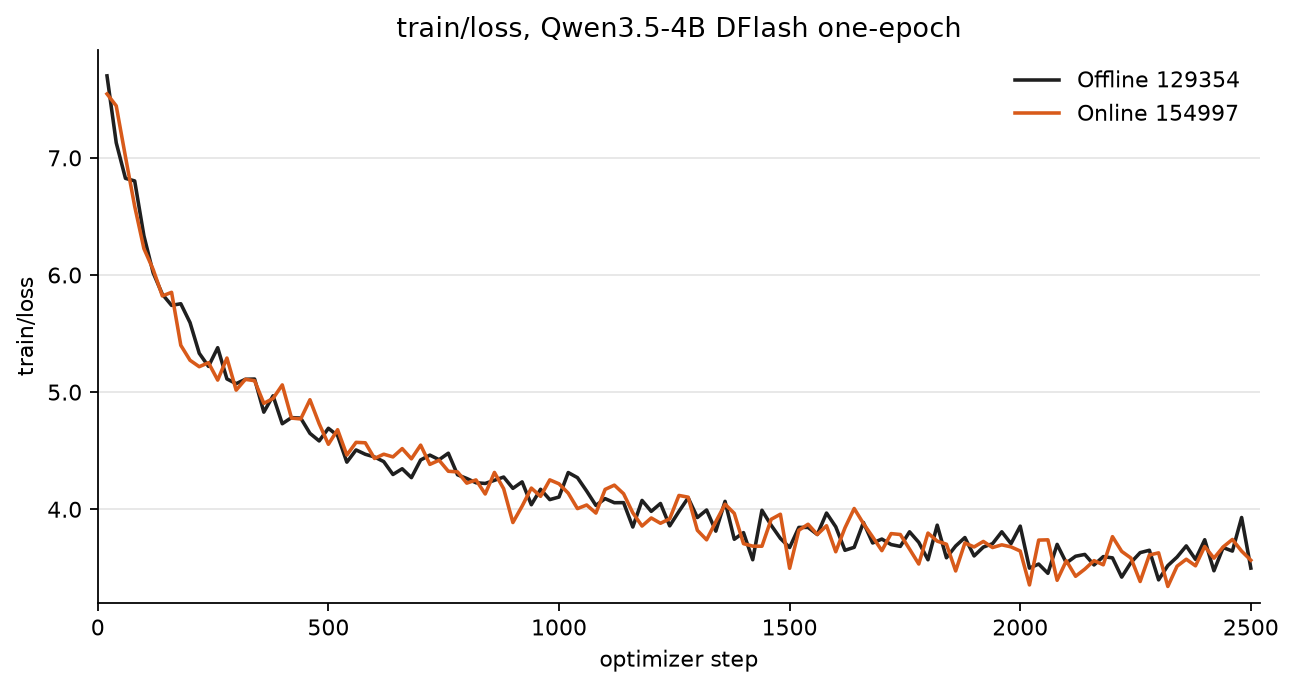
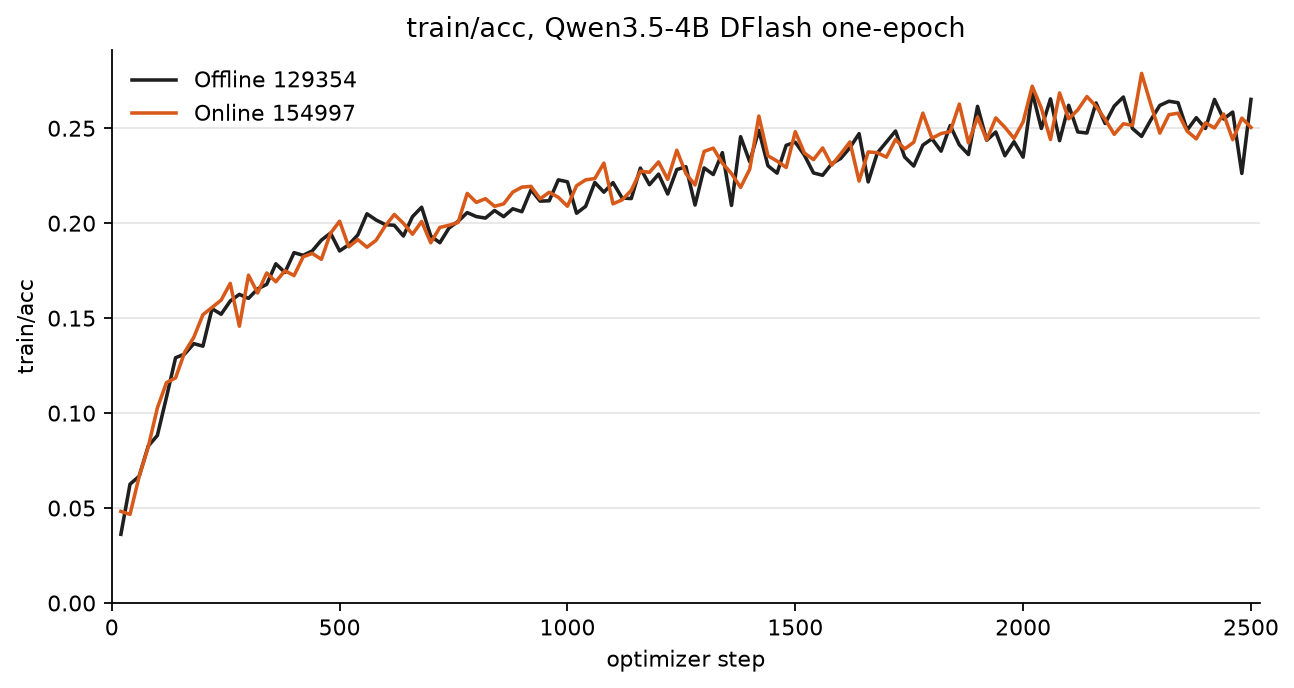
Qwen3.5-4B DFlash, one epoch. Prompts were leak-filtered (exact-row and
first-user-turn) and 256 unique rows were held out for eval. Train labels
are the target’s own greedy thinking continuations (temperature=0,
reasoning saved) — not original ShareGPT assistant text.
Both runs used the example YAMLs above via primus-cli, 8 trainer GPUs,
batch 2, accumulation 1, log_interval=20, save_interval=240,
MAX_STEPS=2510 (~40k refs). Offline captured hidden states to disk
(max_length=2048) then trained. Online recaptured the same train prompts
live (8 SGLang TP=1 + 8 trainer GPUs).
Offline train:
export MAX_STEPS=2510
export NPROC_PER_NODE=8
./runner/primus-cli direct -- train pretrain \
  --config examples/specforge/configs/qwen3.5-4b-dflash-offline.yaml \
  specforge_overrides.training.num_epochs=1 \
  specforge_overrides.training.batch_size=2 \
  specforge_overrides.training.accumulation_steps=1 \
  specforge_overrides.training.save_interval=240 \
  specforge_overrides.training.log_interval=20
Online train (8+8):
export MAX_STEPS=2510
export NPROC_PER_NODE=8
export SERVER_COUNT=8
export SERVER_TP=1
# SERVER_GPUS / TRAINER_GPUS default 0 → 0..7 when the counts above are 8.
./runner/primus-cli slurm srun -N 2 --gres=gpu:8 \
  -- container --image primus-specforge:v0.5.14-rocm700-mi35x \
  --volume /shared:/shared \
  -- train pretrain \
  --config examples/specforge/configs/qwen3.5-4b-dflash-online.yaml \
  specforge_overrides.training.num_epochs=1 \
  specforge_overrides.training.batch_size=2 \
  specforge_overrides.training.accumulation_steps=1 \
  specforge_overrides.training.save_interval=240 \
  specforge_overrides.training.log_interval=20 \
  specforge_overrides.runtime.in_flight_high_watermark=64 \
  specforge_overrides.runtime.in_flight_low_watermark=32 \
  specforge_online.mooncake_lease_ttl_ms=8000
Held-out SGLang eval on 1 GPU after specforge export --to hf and
normalizing the draft to DFlashDraftModel / block_size=16: --tp-size 1,
--max-running-requests 1, --mem-fraction-static 0.75,
--attention-backend aiter, --disable-radix-cache, --disable-cuda-graph,
--reasoning-parser qwen3. 256 prompts, thinking on, EOS on, 64 new tokens,
concurrency 1.
Offline |
Online |
|
|---|---|---|
Target-only tok/s |
52.14 |
52.12 |
DFLASH tok/s |
151.76 |
156.45 |
MAL |
3.662 |
3.649 |
Speedup |
2.911x |
3.002x |