Debug Symbols#
2026-09-25
10 min read time
A debug symbol is a set of strings attached to a MIGraphX instruction that travels with the instruction through the compilation pipeline. Symbols are inserted automatically when an ONNX graph is parsed, or manually when constructing instructions through the Python API. After the graph is compiled to a target backend, the surviving symbols make it possible to correlate the lowered IR back to the original ONNX node names (or any other source-level construct), which is useful when debugging fusion, lowering, or numerical issues in a compiled program.
Using Debug Symbols#
Enabling via the ONNX parser#
Debug symbols are enabled when parsing ONNX by setting the use_debug_symbols
flag on onnx_options. Example usage with the C++ API:
#include <migraphx/migraphx.hpp>

int main(int argc, char** argv)
{
    migraphx::onnx_options options;
    options.set_use_debug_symbols(true);
    auto prog = migraphx::parse_onnx("conv_transpose_test.onnx", options);
}
The same flag can be enabled from the migraphx-driver tool with the
--debug-symbols option:
migraphx-driver read <path_to_model.onnx> --debug-symbols
migraphx-driver compile <path_to_model.onnx> --debug-symbols
The equivalent Python API passes use_debug_symbols to parse_onnx:
import migraphx

prog = migraphx.parse_onnx("model.onnx", use_debug_symbols=True)
When enabled, the ONNX parser inserts the parsed ONNX node name into each
resultant MIGraphX instruction. The text after the # in the IR listing is
the debug symbol(s) for that instruction.
The following examples use mnist-8.onnx, a small classification model
available in the
ONNX model zoo.
Parsed (uncompiled) IR for that model looks like this:
module: "main"
Input3 = @param:Input3 -> float_type, {1, 1, 28, 28}, {784, 784, 28, 1}
@1 = @literal{-0.044856, 0.00779166, 0.0681008, 0.0299937, -0.12641, 0.140219, -0.0552849, -0.0493838, 0.0843221, -0.0545404} -> float_type, {1, 10}, {10, 1} # Parameter194
@2 = @literal{256, 10} -> int64_type, {2}, {1} # Parameter193_reshape1_shape
@3 = @literal{1, 256} -> int64_type, {2}, {1} # Pooling160_Output_0_reshape0_shape
@4 = @literal{ ... } -> float_type, {16, 1, 1}, {1, 1, 1} # Parameter88
@5 = @literal{-0.16154, -0.433836, 0.0916414, -0.0168522, -0.0650264, -0.131738, 0.0204176, -0.12111} -> float_type, {8, 1, 1}, {1, 1, 1} # Parameter6
@6 = @literal{ ... } -> float_type, {8, 1, 5, 5}, {25, 25, 5, 1} # Parameter5
@7 = @literal{ ... } -> float_type, {16, 8, 5, 5}, {200, 25, 5, 1} # Parameter87
@8 = @literal{ ... } -> float_type, {16, 4, 4, 10}, {160, 40, 10, 1} # Parameter193
@9 = reshape[dims={256, 10}](@8) -> float_type, {256, 10}, {10, 1} # Times212_reshape1
@10 = convolution[padding={2, 2, 2, 2},stride={1, 1},dilation={1, 1},group=1,padding_mode=0](Input3,@6) -> float_type, {1, 8, 28, 28}, {6272, 784, 28, 1} # Convolution28
@11 = multibroadcast[out_lens={1, 8, 28, 28},out_dyn_dims={}](@5) -> float_type, {1, 8, 28, 28}, {0, 1, 0, 0} # Plus30
@12 = add(@10,@11) -> float_type, {1, 8, 28, 28}, {6272, 784, 28, 1} # Plus30
@13 = relu(@12) -> float_type, {1, 8, 28, 28}, {6272, 784, 28, 1} # ReLU32
@14 = pooling[mode=max,padding={0, 0, 0, 0},padding_mode=0,stride={2, 2},lengths={2, 2},dilations={1, 1},ceil_mode=0,count_include_pad=0,lp_order=2,dyn_global=0](@13) -> float_type, {1, 8, 14, 14}, {1568, 196, 14, 1} # Pooling66
@15 = convolution[padding={2, 2, 2, 2},stride={1, 1},dilation={1, 1},group=1,padding_mode=0](@14,@7) -> float_type, {1, 16, 14, 14}, {3136, 196, 14, 1} # Convolution110
@16 = multibroadcast[out_lens={1, 16, 14, 14},out_dyn_dims={}](@4) -> float_type, {1, 16, 14, 14}, {0, 1, 0, 0} # Plus112
@17 = add(@15,@16) -> float_type, {1, 16, 14, 14}, {3136, 196, 14, 1} # Plus112
@18 = relu(@17) -> float_type, {1, 16, 14, 14}, {3136, 196, 14, 1} # ReLU114
@19 = pooling[mode=max,padding={0, 0, 0, 0},padding_mode=0,stride={3, 3},lengths={3, 3},dilations={1, 1},ceil_mode=0,count_include_pad=0,lp_order=2,dyn_global=0](@18) -> float_type, {1, 16, 4, 4}, {256, 16, 4, 1} # Pooling160
@20 = reshape[dims={1, 256}](@19) -> float_type, {1, 256}, {256, 1} # Times212_reshape0
@21 = dot(@20,@9) -> float_type, {1, 10}, {10, 1} # Times212
@22 = add(@21,@1) -> float_type, {1, 10}, {10, 1} # Plus214
@23 = @return(@22) # @output_0:Plus214_Output_0
Propagation through compilation passes#
Debug symbols propagate through the compilation pipeline. Replaced or fused
instructions inherit all the symbols of the instructions they replace, so a
single ONNX node name can end up attached to multiple lowered instructions.
Continuing with mnist-8.onnx, the compiled GPU IR is:
module: "main"
@0 = check_context::migraphx::gpu::context -> float_type, {}, {}
@1 = hip::hip_allocate_memory[shape=int8_type, {31360}, {1},id=main:scratch] -> int8_type, {31360}, {1}
@2 = hip::hip_copy_literal[id=main:@literal:5] -> float_type, {1, 10}, {10, 1} # Parameter194
@3 = hip::hip_copy_literal[id=main:@literal:4] -> float_type, {256, 10}, {10, 1} # Times212_reshape1
@4 = hip::hip_copy_literal[id=main:@literal:3] -> float_type, {16, 1, 1}, {1, 1, 1} # Parameter88
@5 = hip::hip_copy_literal[id=main:@literal:1] -> float_type, {8, 1, 1}, {1, 1, 1} # Parameter6
@6 = hip::hip_copy_literal[id=main:@literal:0] -> float_type, {8, 1, 5, 5}, {25, 25, 5, 1} # Convolution28, Parameter5
@7 = hip::hip_copy_literal[id=main:@literal:2] -> float_type, {16, 8, 5, 5}, {200, 25, 5, 1} # Convolution110, Parameter87
@8 = load[offset=6272,end=31360](@1) -> float_type, {1, 8, 28, 28}, {6272, 784, 28, 1}
@9 = multibroadcast[out_lens={1, 8, 28, 28},out_dyn_dims={}](@5) -> float_type, {1, 8, 28, 28}, {0, 1, 0, 0} # Plus30
Input3 = @param:Input3 -> float_type, {1, 1, 28, 28}, {784, 784, 28, 1} # Convolution28
@11 = gpu::code_object[code_object=5632,symbol_name=channelwise_conv_add_relu_kernel,global=11520,local=480,](Input3,@6,@9,@8) -> float_type, {1, 8, 28, 28}, {6272, 784, 28, 1} # Convolution28, Plus30, ReLU32
@12 = load[offset=0,end=6272](@1) -> float_type, {1, 8, 14, 14}, {1568, 196, 14, 1}
@13 = gpu::code_object[code_object=5384,symbol_name=pooling_kernel,global=6272,local=256,](@11,@12) -> float_type, {1, 8, 14, 14}, {1568, 196, 14, 1} # Convolution110, Pooling66
@14 = load[offset=6272,end=18816](@1) -> float_type, {1, 16, 14, 14}, {3136, 196, 14, 1}
@15 = gpu::code_object[code_object=6184,symbol_name=mlir_convolution_add_relu,global=1792,local=256,output_arg=3,](@13,@7,@4,@14) -> float_type, {1, 16, 14, 14}, {3136, 196, 14, 1} # Convolution110, Plus112, ReLU114
@16 = load[offset=0,end=1024](@1) -> float_type, {1, 16, 4, 4}, {256, 16, 4, 1}
@17 = gpu::code_object[code_object=5512,symbol_name=pooling_kernel,global=2048,local=256,](@15,@16) -> float_type, {1, 16, 4, 4}, {256, 16, 4, 1} # Pooling160
main:#output_0 = @param:main:#output_0 -> float_type, {1, 10}, {10, 1} # @output_0:Plus214_Output_0
@19 = gpu::code_object[code_object=6176,symbol_name=mlir_reshape_dot_add,global=64,local=64,output_arg=3,](@17,@3,@2,main:#output_0) -> float_type, {1, 10}, {10, 1} # Plus214, Times212, Times212_reshape0
@20 = @return(@19) # @output_0:Plus214_Output_0
Adding via the Python API#
Debug symbols can also be attached manually when adding instructions through the Python API:
import migraphx

p = migraphx.program()
mm = p.get_main_module()
s = migraphx.shape(lens=[2, 3], type="float")
x = mm.add_parameter("x", s)
y = mm.add_parameter("y", s)
add_ins = mm.add_instruction(migraphx.op("add"), [x, y],
                             debug_symbols=["sym_a", "sym_b"])
assert add_ins.get_debug_symbols() == {"sym_a", "sym_b"}
Adding via Python macros#
The same debug_symbols keyword is accepted by the macro APIs. Every
instruction that the macro expands to inherits the supplied symbols:
import numpy as np
import migraphx

p = migraphx.program()
mm = p.get_main_module()

a_data = np.array([[1.0, 2.0, 3.0],
                   [4.0, 5.0, 6.0]], dtype=np.float32)
b_data = np.array([[7.0,  8.0],
                   [9.0,  10.0],
                   [11.0, 12.0]], dtype=np.float32)
a = mm.add_literal(migraphx.argument(a_data))
b = mm.add_literal(migraphx.argument(b_data))

gemm_mac = migraphx.macro("gemm")
gemm_result = mm.add_macro(gemm_mac, [a, b])
einsum_mac = migraphx.macro("einsum", equation="ij,jk->ik")
einsum_result = mm.insert_macro(gemm_result[0], einsum_mac, [a, b],
                                debug_symbols=["macro:einsum"])
Examining Debug Symbols#
Tracing inputs back to ONNX nodes#
Because each compiled instruction carries the ONNX node names that contributed
to it, the symbols on an instruction’s input chain reveal where its data came
from in the source model. To illustrate, the excerpt below shows the relevant
slice of the compiled mnist-8.onnx IR. For readability, the inputs of the
instruction of interest are labelled arg_0..arg_4 -> and the instruction
itself is labelled kernel ->. These prefixes are not part of the IR — they
are only annotations added here:
arg_2 -> @4 = hip::hip_copy_literal[id=main:@literal:3] -> float_type, {16, 1, 1}, {1, 1, 1} # Parameter88
arg_1 -> @7 = hip::hip_copy_literal[id=main:@literal:2] -> float_type, {16, 8, 5, 5}, {200, 25, 5, 1} # Convolution110, Parameter87
arg_0 -> @13 = gpu::code_object[code_object=5384,symbol_name=pooling_kernel,global=6272,local=256,](@11,@12) -> float_type, {1, 8, 14, 14}, {1568, 196, 14, 1} # Convolution110, Pooling66
arg_4 -> @14 = load[offset=6272,end=18816](@1) -> float_type, {1, 16, 14, 14}, {3136, 196, 14, 1}
kernel -> @15 = gpu::code_object[code_object=6184,symbol_name=mlir_convolution_add_relu,global=1792,local=256,output_arg=3,](@13,@7,@4,@14) -> float_type, {1, 16, 14, 14}, {3136, 196, 14, 1} # Convolution110, Plus112, ReLU114
Looking at instruction @15 (annotated as kernel), the code_object
name mlir_convolution_add_relu indicates a fused convolution with bias and
a ReLU activation. Its debug symbols Convolution110, Plus112, ReLU114
correspond to the original ONNX Conv, Add, and Relu nodes that
were fused into a single kernel.
To trace its inputs with respect to the ONNX model, look at the input
instructions to @15: (@13, @7, @4, @14).
Instruction
@13(arg_0) is a pooling kernel with debug symbolsConvolution110, Pooling66.Pooling66is the ONNX node name of theMaxPoolnode that supplied the convolution’s input, so we know it is a max pooling. The additionalConvolution110symbol means a compilation pass that touched@15also altered@13.Instruction
@7(arg_1) is a literal with debug symbolsConvolution110, Parameter87.Parameter87is the initializer name for the weights tensor ofConvolution110.
Symbol propagation across instructions#
Because compiler passes propagate debug symbols, replaced instructions inherit
the symbols of the instructions they replace. A single parsed ONNX symbol can
therefore end up attached to multiple compiled instructions — for example,
Convolution110 appears in several places in the listing above.
Here is another example with horizontal fusion of two GEMM operations.
Before horizontal fusion:
@0 = @literal{ ... } -> int32_type, {3, 2, 2}, {4, 2, 1}
@1 = @literal{ ... } -> int32_type, {3, 2, 2}, {4, 2, 1}
input = @param:input -> int32_type, {3, 2, 2}, {4, 2, 1}
@3 = dot(input,@1) -> int32_type, {3, 2, 2}, {4, 2, 1} # gemm1
@4 = dot(input,@0) -> int32_type, {3, 2, 2}, {4, 2, 1} # gemm2
@5 = add(@3,@4) -> int32_type, {3, 2, 2}, {4, 2, 1} # sum
@6 = @return(@5)
After horizontal fusion:
@0 = @literal{ ... } -> int32_type, {3, 2, 2}, {4, 2, 1}
@1 = @literal{ ... } -> int32_type, {3, 2, 2}, {4, 2, 1}
input = @param:input -> int32_type, {3, 2, 2}, {4, 2, 1}
@3 = concat[axis=2](@1,@0) -> int32_type, {3, 2, 4}, {8, 4, 1} # gemm1, gemm2
@4 = dot(input,@3) -> int32_type, {3, 2, 4}, {8, 4, 1} # gemm1, gemm2
@5 = slice[axes={2},starts={0},ends={2}](@4) -> int32_type, {3, 2, 2}, {8, 4, 1} # gemm1, gemm2
@6 = slice[axes={2},starts={2},ends={4}](@4) -> int32_type, {3, 2, 2}, {8, 4, 1} # gemm1, gemm2
@7 = add(@5,@6) -> int32_type, {3, 2, 2}, {4, 2, 1} # sum
@8 = @return(@7)
The IR after the horizontal fusion shows that the new concat, dot, and
slice instructions all have the debug symbols gemm1, gemm2, showing
that both original dot instructions were fused together.
Graphical analysis with Netron#
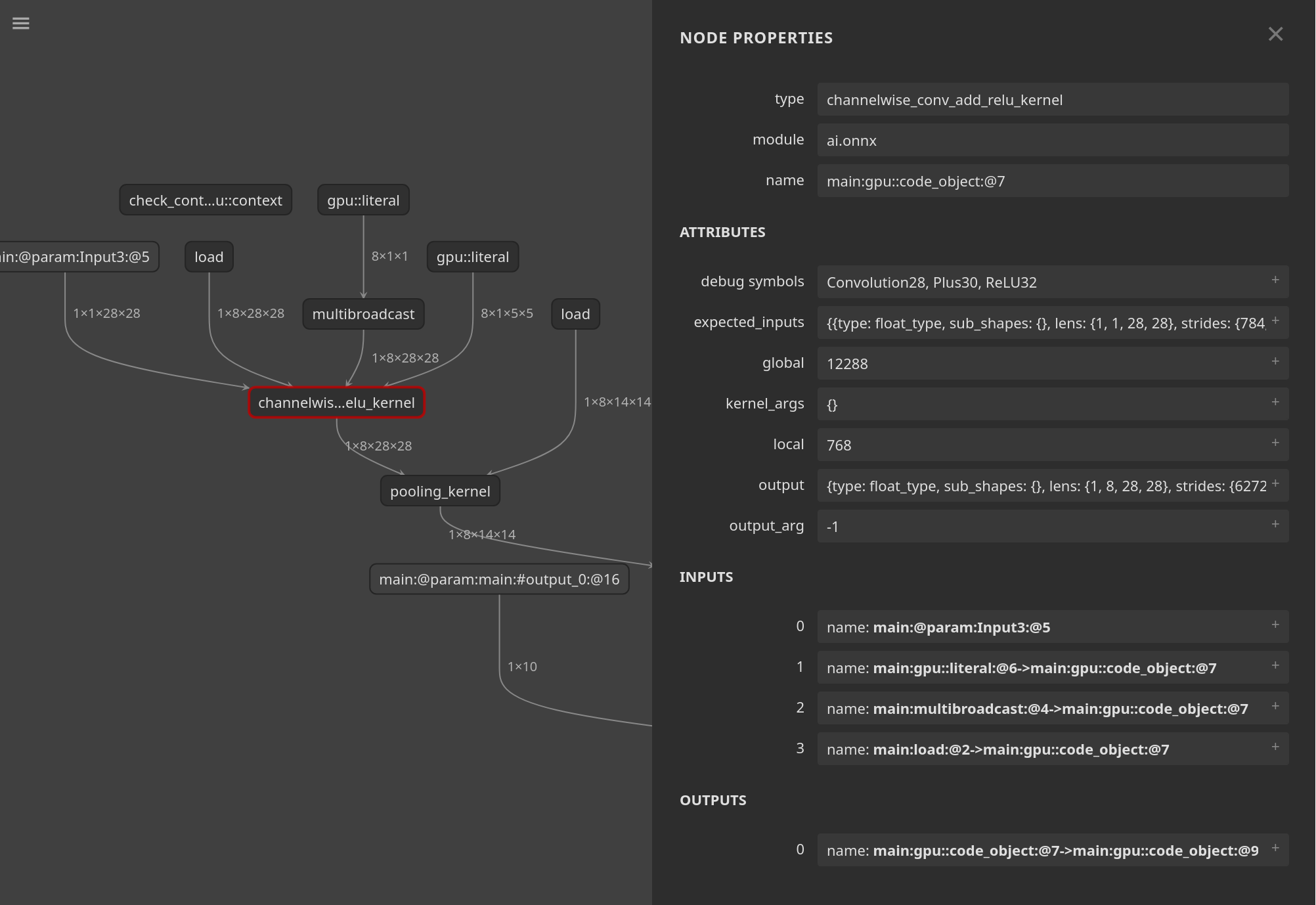
MIGraphX has a feature to output an ONNX-like protobuf file that can be read by
the Netron tool. You can create the file using
migraphx-driver with the --debug-symbols, --netron, and
--output options:
migraphx-driver compile mnist-8.onnx --netron --debug-symbols --output mnist8_netron.onnx
Using Netron to open the file allows for an interactive way to explore the compiled IR:
Limitations#
Debug symbols from the ONNX parser are only inserted when
onnx_options::use_debug_symbols(or the driver’s--debug-symbolsflag) is set; they are off by default.The debug-symbol mechanism is currently only wired up to the ONNX parser. Other front-ends (for example, the TensorFlow parser under
src/tf/) do not populate symbols automatically — they can still be added manually through the Python API.Symbols are an opaque set of strings. They have no semantics inside the compiler beyond being copied along when an instruction is replaced.
Symbols are intended for debugging and inspection only; they should not be relied on as a stable contract because compilation passes can rewrite them freely (merge sets, drop instructions, etc.).